New in Entrovox: A Usage Page, Numbers That Get Answered, and First Crack for Your Team
See exactly how many calls you have left, buy outbound numbers that are screened and registered before they ever dial, and give your licensed agents a head start on every live lead.
Last month's update gave the AI a new job — calling your book of business instead of only your new leads. This one is about everything around the job: the numbers you check, the dials you turn, and the phone numbers the calls actually go out on.
None of it changes what a call sounds like. All of it changes how much of your own operation you can see and steer.
Here's what shipped, at a glance:
- A Usage page — calls remaining, your pace for the cycle, and a reset date that follows your start date.
- Numbers screened before you buy them — reputation in the buy list, carrier registration on purchase, and one-click re-screening after.
- First crack for your licensed agents — an optional head start on live leads before the AI dials.
- Why every call happened — a Why column on your calls list, and the reason on every call.
- A lead breakdown that adds up — two sections, both with totals the rows sum to.
- Sequences you can change mid-flight — no more starting a source over to change how it calls.
- A faster Ricochet360 sync — ten times the events per cycle, plus a new control for fresh leads.
New: a Usage page that shows what you have left
Under Account in the sidebar there is now a Usage page, and it leads with the number that actually matters.
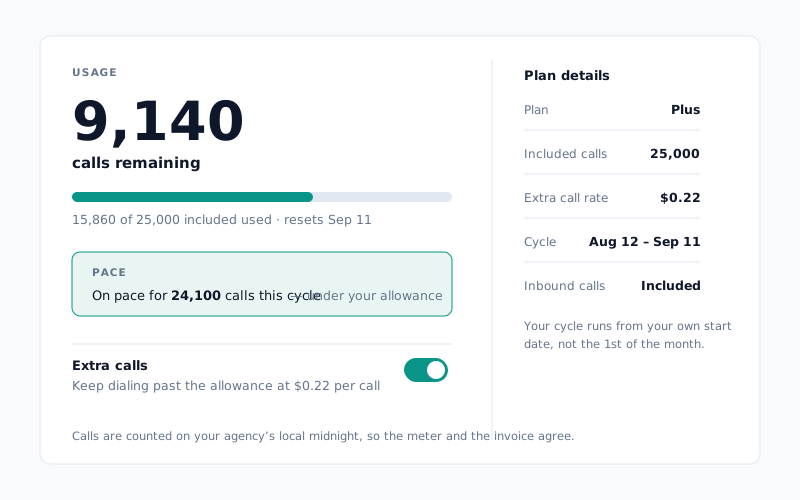
Not calls used — calls remaining, because that is the number you make decisions with at 3pm on a Thursday. Under it: the meter, the date your allowance resets, and a pace strip that projects where you land if the rest of the cycle looks like the part you have already run. The extra-calls control sits on the same page, so deciding to keep dialing past your allowance and seeing what that will cost are the same glance.
Your cycle, not the calendar's
The bigger change is underneath, and it is the reason the page can be trusted.
Your allowance used to be counted over the calendar month while your invoice was cut over your subscription's own period. For any agency that did not happen to start on the 1st, those are different windows — so the meter and the bill were describing different sets of days, and both were right about their own.
There is one clock now. Every quota check reads your subscription's cycle, and the calendar-month path is gone from the code entirely. Two consequences worth knowing:
- Your cycle runs from your start date. Start on the 17th and your cycle is the 17th to the 16th. That is also when the meter resets.
- Calls are counted on your agency's local midnight, not UTC's. A call placed at 9pm Pacific belongs to the day you placed it, on the meter and on the invoice alike.
One decision we made explicitly while doing this: inbound AI calls draw on the same allowance as outbound ones. An inbound call costs the same telephony and model spend, so it meters the same. It is a small slice in practice — well under a percent of volume on a recent production cycle — but we would rather write it down than have you discover it.
The Usage page is an owner-and-manager surface. Members do not see it, because it shows your plan pricing.
New: numbers that are screened before you buy them
The spam-likely problem has two halves. One is how your numbers behave once they are dialing. The other is what they were doing before you owned them — and that half is decided at the moment of purchase, when it is cheapest to fix.
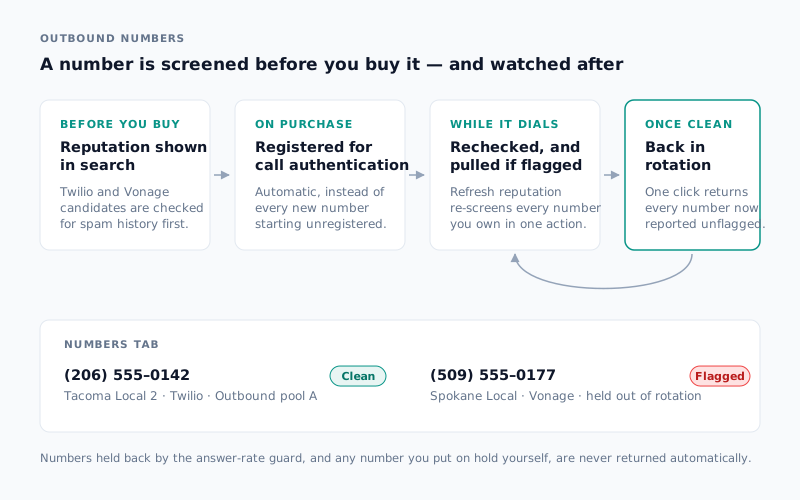
Reputation now shows in the buy list. Twilio and Vonage candidates are screened before purchase, so a number arriving with somebody else's history is something you can see rather than something you find out from your connect rate three weeks later.
Twilio numbers you buy through Entrovox are registered for carrier call authentication automatically. Previously a purchased number started unregistered, at the lowest attestation level and undeclared to carriers, until somebody remembered to go and do it. Now it happens as part of the purchase — and we backfilled the existing fleet so nothing is sitting in the old state.
After that, the Numbers tab became a place you can work rather than a list you can read:
- Refresh reputation re-screens every eligible number you own in one action.
- Unquarantine clean numbers returns every number that reputation now reports unflagged to outbound rotation in one click. Numbers held back by the answer-rate guard, and anything you put on hold yourself, stay put — that is deliberate, because those two are held for reasons reputation cannot see.
- Assign an outbound pool inline from the table, instead of going to the Pools tab to move one number.
- Search by digits or friendly name, sort every column, and export the current view as a CSV.
- See the carrier on every row: a Provider column, and color-coding across pool chips and badges, so a mixed-carrier account is scannable at a glance.
Test Call surfaces got the same treatment on a smaller scale — the "call from" picker is a searchable combobox now, so you can type the last four digits instead of scrolling a list of eighty numbers.
New: give your licensed agents first crack
Speed to lead is the whole argument for calling in the first place — the five-minute rule is not a slogan, it is a decay curve. But "instant" is not always what an agency wants during the working day. Some owners want their own licensed agents on a fresh lead first, and the AI to catch what the desk does not get to.
That is now a setting.
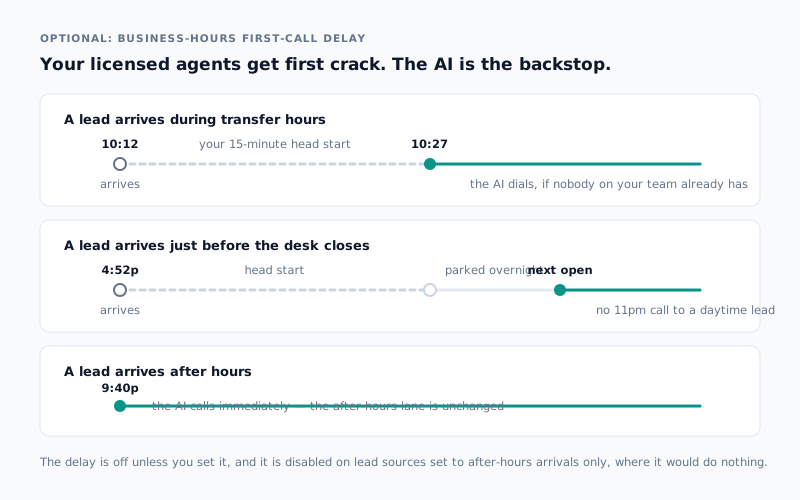
Each lead source can carry an optional business-hours first-call delay. A live lead that arrives inside your transfer hours is held for however many minutes you pick. If one of your licensed agents reaches it in that window, nothing else happens. If nobody does, Entrovox dials.
Three things we were careful about:
- After-hours arrivals are untouched. The after-hours lane exists precisely because there is nobody at the desk at 9pm, so a delay there would be a delay for its own sake. Those leads are still called on arrival.
- A delay never turns a daytime lead into a night call. If the wait would land after your transfer hours close, the dial parks until the next morning you are open — federal holidays and the days you skip included. A 4:52pm lead does not become an 11pm call.
- The control disables itself where it would do nothing. On a source set to after-hours arrivals only, it grays out and says why, rather than sitting there looking interactive.
It is off unless you turn it on, and you can set it when you create a source or change it on one that is already running.
New: why every call happened
Your calls list has a new Why column.
Every call now records its own origin at the moment it is created — first dial, a retry on a sequence, a booked callback, an inbound call from a lead you already know — instead of leaving you to reconstruct it from timestamps and lead-source names. The list shows the short version; open a call and there is a Why this call block with the fuller reason.
The case it was really built for is the awkward one: a lead that exists in more than one of your sources. Inbound recognition now attributes that person to the outbound call they are actually returning, rather than to whichever list touched their record most recently.
New: a lead breakdown that adds up
The Lead & call breakdown card on a lead source got rebuilt, twice, and the second rebuild is the one worth describing.
It is now two sections, and both of them have a visible total that the rows above it sum to:
- Where the leads stand — one row per lead, bucketed by the best outcome that lead ever reached. This is a true partition: every lead is in exactly one bucket, and the buckets sum to your lead count.
- Call outcomes — one row per call, also a partition, with the overlapping signals you actually care about (transferred, callbacks) shown underneath as "of which" subrows rather than being added into a total they would double-count.
That sounds like a small thing and is not. A card whose rows do not visibly reconcile to a number you recognize is a card nobody trusts, so nobody uses. Both halves are computed from call events, so what you see is what happened rather than a status field that decays as leads age out.
New: change the contact sequence without starting over
A contact sequence used to be locked the moment a lead source went live. If you wanted to call a list differently, you started a new source.
You can change it now, on an active or a paused source. Entrovox shows you a preview of what the change touches before you confirm, then cancels pending callbacks on the old sequence, retires the leads still waiting on it, and leaves calls already in flight alone. If any part of that cannot be completed, the change is abandoned rather than half-applied.
Improved: Ricochet360 keeps up with a busy day
Two changes for agencies running the Ricochet360 integration, both about volume.
The webhook drain got ten times bigger. Entrovox now processes up to 1,000 CRM events per organization per five-minute cycle, up from 100. On a heavy day the old ceiling meant the picture of your CRM lagged the CRM itself; it does not now.
You can let brand-new leads skip the cool-down. The integration holds a lead for a cool-down period after certain CRM activity, which is right for an aged record and wrong for a lead that came in eleven minutes ago and is still shopping. There is a new per-lead-source setting — Skip pause for new leads — that lets you name an age below which the cool-down does not apply. It only affects that timing pause: leads your team has genuinely finished with, and anything on your do-not-call list, are untouched.
One console, one set of screens
The classic console has been retired. Every old URL redirects to its /v2 equivalent, so existing bookmarks keep working, and there is now one set of screens rather than two drifting versions of the same product. Everything above lives there.
Where this fits with everything else
- Usage answers the question pricing raises. Knowing what a program costs is one thing; knowing where you are in the month is what makes it manageable — the underlying math is in what it costs per bind.
- Reputation is the other half of connect rate. Dialing first only pays if the phone gets answered; why calls get flagged as spam covers the mechanics.
- The first-call delay is a speed-to-lead decision, not a slowdown. It is worth reading the five-minute rule before you set it to twenty minutes.
- The handoff has not changed. A good call still ends with a licensed agent — live transfer vs. callback is the comparison.
Visibility and control are two lines on the AI voice agent for insurance agencies scorecard, and they are the two that decide whether you keep running a program six months in.
What to do this week
Three things, none of which take longer than a coffee:
- Open Usage and check the pace strip. If you are on track to finish the cycle well under your allowance, you have room to turn on a source you have been holding back.
- Open the Numbers tab and hit Refresh reputation. Then use Unquarantine clean numbers to put anything that has recovered back into rotation. Both of those were previously a support request.
- Pick one lead source and try a ten-minute first-call delay during transfer hours. Then compare its transfer rate against a source without one. If your desk is faster than the AI on live leads, you will see it; if it is not, you have learned that too.
Want a walk through your own numbers? Book a 20-minute demo and we will open the Usage page together.