New in Entrovox: Your AI Texts Leads Back, and Plugs Into HighLevel and MediaAlpha
Two-way texting that books callbacks, a Messages page that counts replies in leads, HighLevel and MediaAlpha integrations, and an AI voice agent that knows more about each lead.
Five weeks ago, Entrovox was a calling platform. Today, your AI voice agent can also hold a text conversation, and it can pull leads straight from the tools you already use.
Most of your leads don't pick up the first time. Plenty of them will text you back. Until now that reply landed in a phone nobody was watching. Now the AI answers it, offers real callback times, and books the one the lead picks.
Here's what shipped, at a glance:
- Two-way texting that books callbacks — the AI answers replies in seconds and books the time the lead picks.
- A Messages page that counts leads, not texts — see who replied and who ended up on a call.
- HighLevel, Ricochet and MediaAlpha integrations — enroll CRM contacts, sync outcomes, and accept leads posted directly.
- A smarter AI voice agent — books the exact time a lead names, confirms lead details, and two new voices.
- More control over your lead sources — change a sequence without stopping leads, swap the AI voice agent, archive old sources.
- Lead Return Assistant — a regular spreadsheet of leads worth returning to EverQuote, QuoteWizard, SmartFinancial and MediaAlpha, ready to file.
- Coming soon — a new Dashboard, browser callbacks for missed transfers, and live call join.
New: your AI texts back
Your sequences can now send texts from your agency's own registered text line, and every reply gets an answer. Add a Text step anywhere in a sequence in Sequences, right next to your call steps.
When a lead replies, the AI handles it the way your AI voice agent would on a call:
- "Who is this?" gets your agency name and why you're reaching out.
- A first "not interested" gets one soft question, not a pushy follow-up.
- A question gets an answer from your FAQ. If your FAQ doesn't cover it, the AI offers two call times and passes the question to the licensed agent who calls.
- "Can you call me tomorrow?" gets real times inside your callback hours. When the lead picks one, it's booked.
- "Call me now" during open hours dials right away.
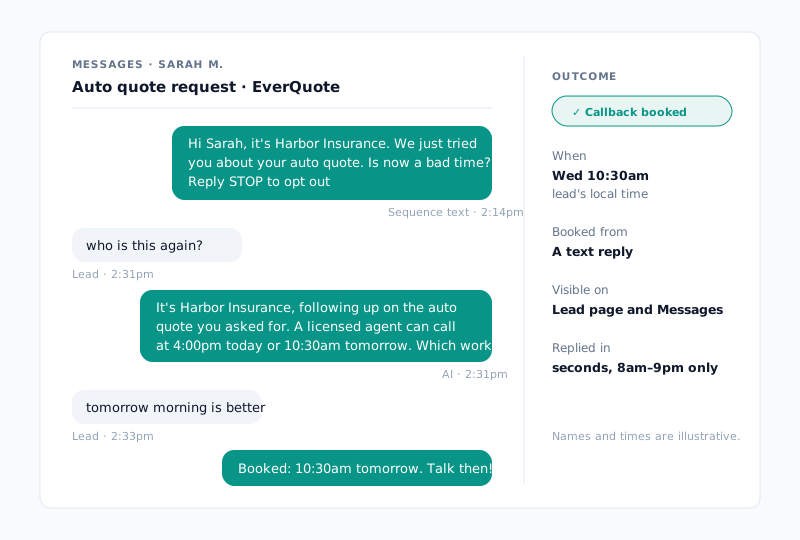
The AI replies within seconds of the lead's last message, and only between 8am and 9pm in the lead's local time. Every sequence text carries "Reply STOP to opt out", and a lead who texts STOP is opted out.
Your plan now includes a monthly text allowance next to your calls: 2,000 texts on Standard, 10,000 on Plus, and 25,000 on Pro. The Usage page shows a Calls meter and a Texts meter side by side, and you choose separately whether extra calls and extra texts are allowed past your allowance.
New: the Messages page
Texting is only worth it if you can see it working. Owners and managers now get a Messages page under Operate > Messages.
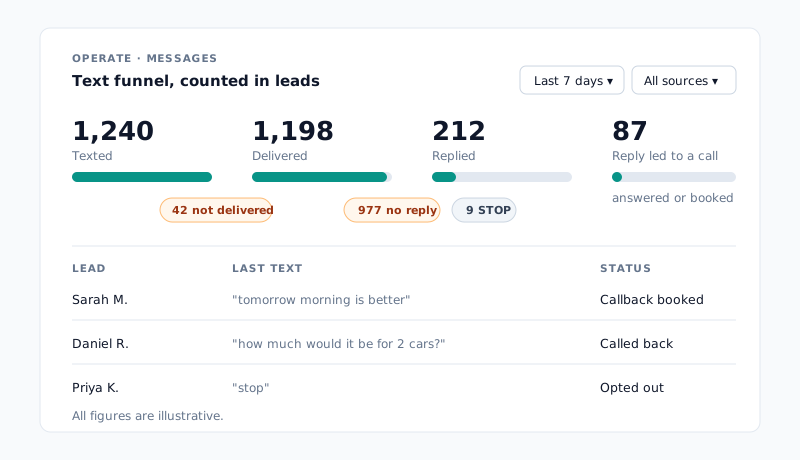
The funnel is counted in leads, not texts, so a lead who got four texts still counts once. It answers the real question: of the people we texted, how many replied and then picked up a call or booked a callback? (A booked callback counts as soon as it's booked, so the last stage is "answered or booked", not "spoke with a licensed agent".)
- Click any drop-off ("977 no reply" or "9 STOP") and the activity list filters to exactly those leads.
- Open any lead to read the whole conversation, the same thread that now appears on the lead's own page.
- Filter by date and lead source, and compare against the previous period.
On the Leads page, a new Texted back view shows every lead who replied, and a Last text column shows when each lead was last texted.
New: plug in HighLevel, MediaAlpha and any lead vendor
Your leads already live somewhere. Entrovox now goes to them.
HighLevel
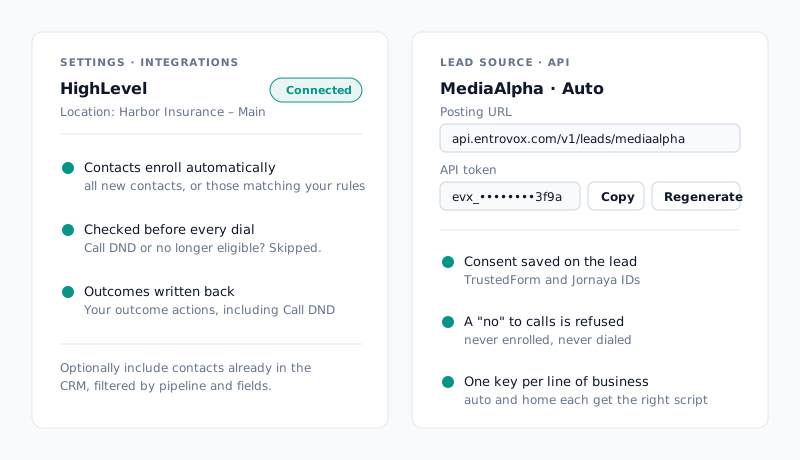
Connect your HighLevel location from Settings > Integrations, and the AI can call the contacts in your CRM. Now you can:
- Enroll contacts automatically. Choose all new contacts or only the ones matching your rules, and optionally include contacts already in your CRM.
- Stay in sync before every dial. If a contact was marked Call DND or stopped being eligible in HighLevel after enrolling, the AI doesn't call them.
- Get outcomes back in HighLevel. Every call's result is written back to the contact using the actions you choose, including Call DND, so your team works from one record.
HighLevel is rolling out to agencies now. If you use it, tell us and we'll connect your account.
Ricochet
If you run your team on Ricochet, a lead who asks the AI not to call again can now be set to Not Interested in Ricochet, so your own staff stop calling them too. Leads who already have a quote are left alone. Ask us to turn it on for your account.
MediaAlpha, and any vendor that posts leads
MediaAlpha can now post auto and home leads straight into Entrovox. The AI calls the lead as soon as it arrives, with the lead's TrustedForm and Jornaya consent saved on the lead. A lead whose post says no to calls is refused instead of dialed, and each line of business gets its own key, so a home lead always gets your home script.
For every other vendor: creating an API lead source now generates its token for you. The lead source's page has a card to view, copy and regenerate it, with setup instructions you can send your vendor.
New: a smarter AI voice agent on every call
- It books the time the lead names. When a lead says "call me at one thirty" or "try me in ten minutes", the AI books that time instead of reading a menu of options. If it's outside your callback hours, the AI says your hours and offers the nearest time that works.
- It can confirm lead details. In the AI voice agent editor, a new Lead details this AI voice agent can use section lets the AI confirm the lead's address, ZIP, date of birth and email. It asks rather than tells: the AI never reads a detail out to someone who hasn't confirmed who they are. Nothing changes until you tick the boxes.
- Two new voices: Kelsey and Nate. Both are in the voice picker for every agency, and Expressive mode works with them.
- Voicemails say the AI's name. Put
{agent_name}in any voicemail, sequence step voicemail or Quick Dial voicemail, and the message says "Hi, this is Robin with…". The Callers hear preview on the AI voice agent form shows exactly what the lead will hear. - Test calls with real lead details. The Test call dialog takes state, ZIP, date of birth, email and vehicle details, so you can hear the AI work with them before a real lead does.
New: change your mind without stranding leads
Running a dozen lead sources means changing things. Those changes no longer cost you leads.
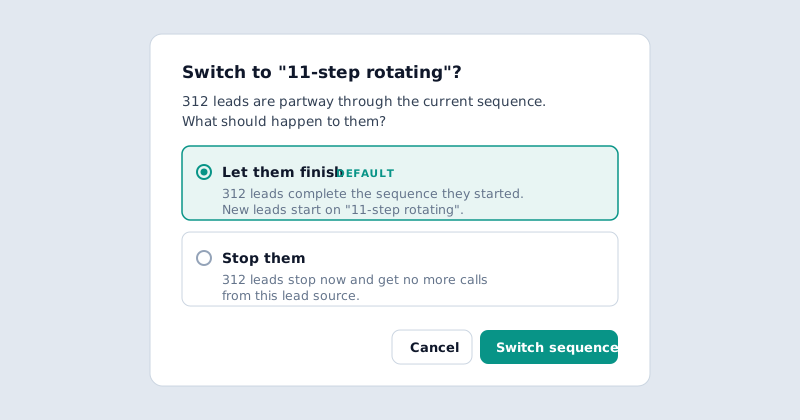
- Switch sequences and let leads finish. Changing the sequence on a running lead source used to stop every lead already in it. Now you choose: let them finish the sequence they started (the default), or stop them. You see how many leads each choice affects first.
- Swap the AI voice agent on a lead source from its How to call settings. It's no longer locked in when you create the source.
- Archive lead sources you're done with. They move to an Archived tab, and an archived source can't restart by accident.
- Mark "asked not to be called" from the call page. Anyone on your team can add the number to your do-not-call list right from the call they just listened to.
New: Lead Return Assistant
When you buy shared leads from vendors like EverQuote, QuoteWizard, SmartFinancial or MediaAlpha, a portion are inevitably bad numbers: disconnected lines, wrong numbers, or leads sent twice. Lead vendors offer credit for these, but filing returns by hand before their deadlines is tedious paperwork agencies often abandon.
The Lead Return Assistant does the detection for you from the calls your AI voice agent already makes:
- Automatic detection from call evidence. Disconnected numbers, carrier operator intercepts, wrong-party responses, and vendor re-sends are flagged automatically based on verified dial outcomes.
- A filing-ready spreadsheet in your inbox. Delivered on a regular schedule (such as Tuesday and Thursday mornings), an Excel workbook with one tab per enabled vendor lists each eligible lead.
- Deadlines and paste-ready copy. Leads are sorted soonest deadline first, complete with the vendor's required return reason, filing deadline, and a pre-written explanation ready to paste straight into the vendor's portal.
- Estimated dollar recovery. See the potential credit recovery for each batch so you know exactly what each filing is worth.
Your team keeps total control: Entrovox identifies the eligible leads and prepares the paperwork, and your team files the return in the vendor portal with a few clicks.
Also new: numbers that keep working, and better timing
- Flagged numbers cool down instead of being pulled. When Hiya flags one of your numbers or its answer rate drops, it keeps dialing at a lower, capped rate rather than going dark. A lead's first call and every promised callback always use a clean number. Phone numbers shows how many lines are Ready, in Cooldown and Quarantined, plus each number's Hiya rating.
- "Best times to reach humans" shows conversation rate. The card on your dashboard now shows conversations per dial in the lead's local time, so a busy hour no longer looks like a good one just because you dialed more.
- Day-based waits land on business days. A step set to wait a day now goes out on the next business day, at the start of that step's calling window. And an email lead that arrives after you close still gets an immediate call that doesn't use up step 1.
- A support center. entrovox.com/support has a CSV formatting guide with copyable headers and the timezone rules that decide when each lead gets called.
Coming soon
A few bigger pieces are built and getting their final checks:
- A new Dashboard that answers "how is my AI doing?" on one screen: a funnel from leads worked to conversations to warm transfers, which sources and lists are performing or running low, every transfer with its recording and summary, and a Needs you card listing what's waiting on you.
- Call back a missed transfer from your browser. When a warm transfer rings out, a licensed agent can call the lead back in one click, from the same number the lead already saw, with no AI on the line. Wrapping up the call stops the AI's follow-up for that lead.
- A licensed agent joins a live call with no wait. While the AI qualifies an engaged lead, your licensed agents get an alert; the first to click "I am available" listens in, and the AI introduces them at a natural pause. It's in pilot with one agency today.
How to get started
- Texting: reach out and we'll set up your agency's text line and turn on two-way replies. Then add Text steps to your sequences in Sequences, and watch the results on Operate > Messages.
- HighLevel or Ricochet: tell us which CRM you use and we'll get it connected. HighLevel lives under Settings > Integrations.
- MediaAlpha or another vendor: create an API lead source in Lead sources > New, copy the token from the source's page, and send your vendor the instructions shown there.
- Your AI voice agent: open it, tick the lead details it may use, try Kelsey or Nate, and place a test call with real lead details.
- Lead Return Assistant: tell us which vendors you buy from (EverQuote, QuoteWizard, SmartFinancial, MediaAlpha) and who should receive the reports, and we'll turn it on for your agency.
Speed to lead and CRM fit are two of the lines on the AI voice agent for insurance agencies scorecard. This release moves both: the AI now answers a reply in seconds, and it works straight from the tools your leads already live in.
Want a hand choosing which texts your sequences should send? Reply to this post or reach out. We're happy to look at your sequences with you.